Standard Roles
In iSpring LMS, there are 6 standard roles:
- Account Owner
- Account Administrator
- Department Administrator
- Course Author
- Learner
- Supervisor
The Account Owner is a user with the broadest permissions. The owner cannot be edited or deleted, and is in full control of the account, including access to billing options. If you create an iSpring LMS account, you are automatically assigned as the Account Owner.
Account Administrators are users who help the owner manage the system. Admins have the same set of permissions as the Account Owner but don’t have access to billing options.
Each Administrator should be given access to projects and content items they need for their work. Otherwise, they won't have access to the content in the account.
Department Administrators are users who have access to user management within their own department.
Course Authors can add, edit, or remove course items and courses.
Learners are regular users with minimal permissions. They can pass courses and check their activity history.
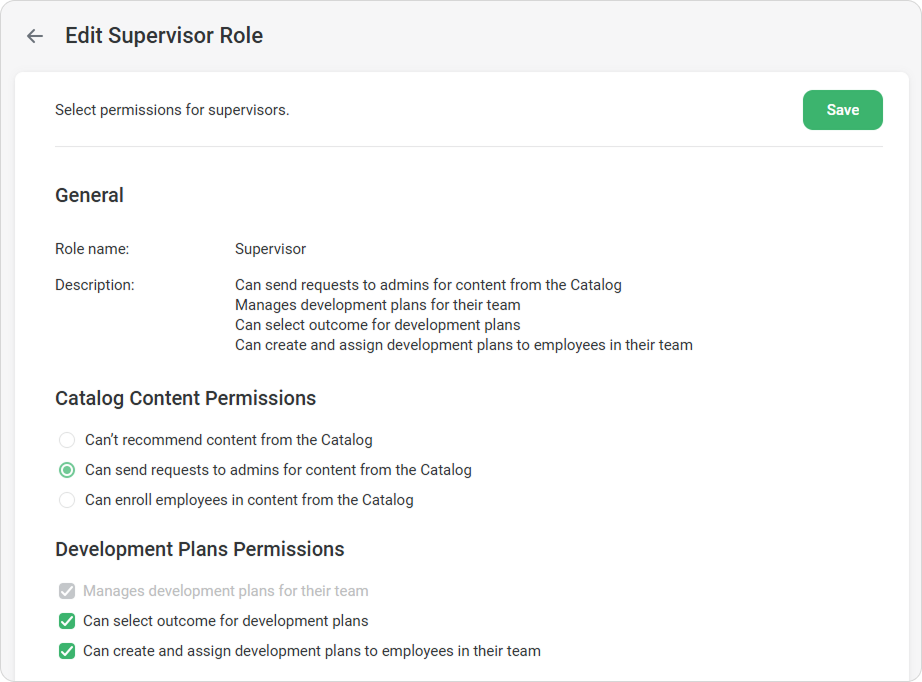
Supervisor can track learners` progress and view statistics on individual and department learning progress. The 'Supervisor' role is given to supervisors and functional managers.
If supervisors have the necessary permissions, they can recommend courses from the catalog, create development plans, and select an outcome for them. You can set these permissions in the role settings.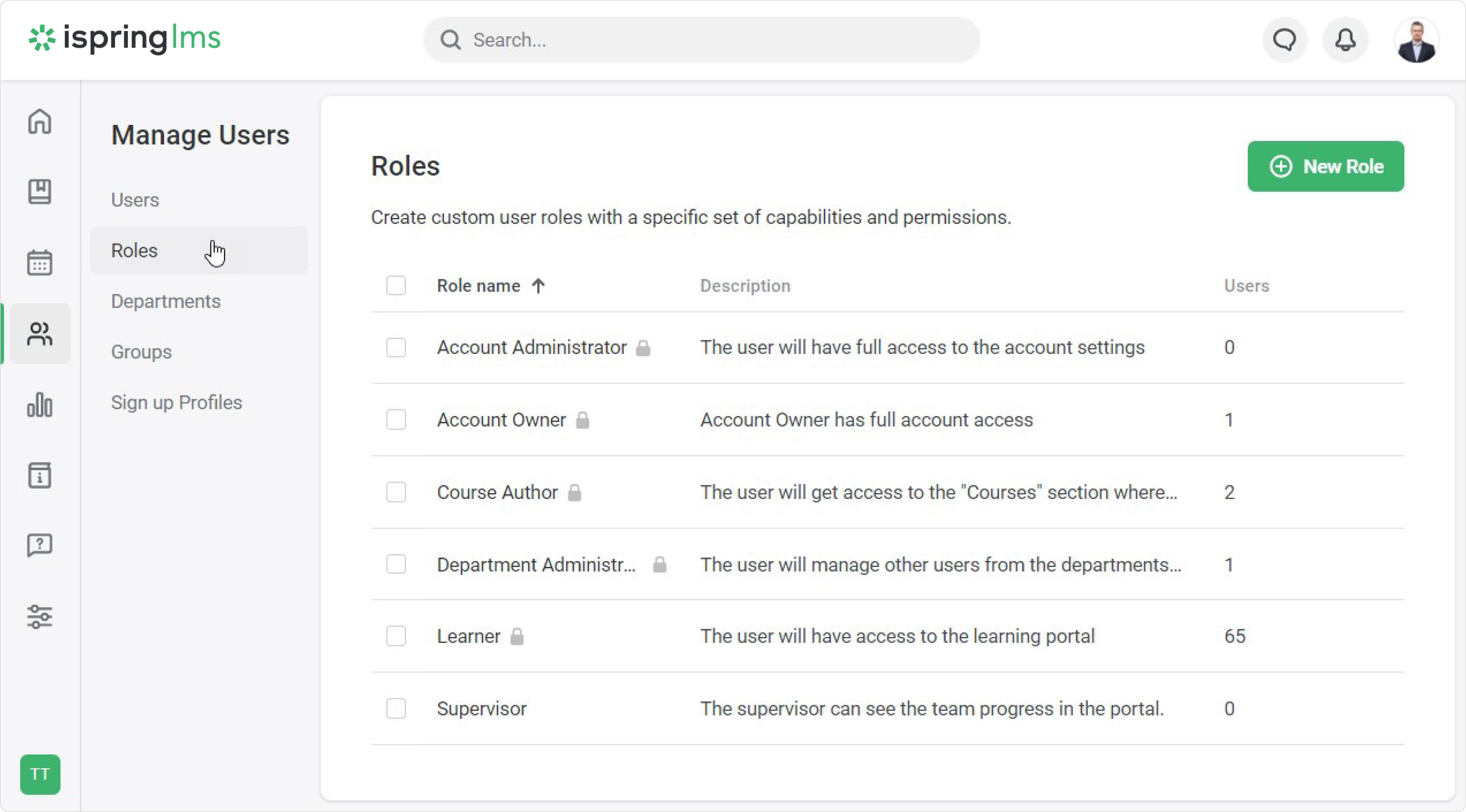
| Permission | Account Owner | Account Administrators | Department Administrators | Course Authors | Learners | Supervisor |
| View Courses | Yes | Yes (if they are given access to a project and its content) | Yes (if they are given access to a project and its content) | Yes (if they are given access to a project and its content) | Only assigned courses | Only assigned courses |
| Create and Edit Courses | Yes | Yes (if they are assigned to the Course Author role and given access to a project and its content) | Yes (if they are assigned to the Course Author role and given access to a project and its content) | Yes (if they are given access to a project and its content) | No | No |
| Create and View Reports | Yes | Yes | Yes (within the departments they manage) | No | No | Yes (in their Supervisor Dashboard, within the departments they manage) |
| Manage Users | Yes | Yes | Yes (within the departments they manage) | No | No | No |
| Manage Groups | Yes | Yes | Yes (within the departments they manage) | No | No | No |
| Manage Events | Yes | Yes | Yes | No | No | No |
| Change Account Settings | Yes | Yes | No | No | No | No |
| Manage Billing | Yes | No | No | No | No | No |
| Create Development Plans | Yes | Yes | No | No | No | Yes, if they have permissions |
| Manage Development Plans | Yes | Yes | No | No | No | Can manage development plans for their team |
| Manage Course and Training Catalog | Yes | Yes | No | No | No | Can recommend courses and training to employees in Catalog in User portal |
Note:
- The Account Owner, Account Administrators, Department Administrators, Course Authors, and Learners cannot be edited, duplicated, or removed.
- The Supervisor cannot be duplicated or removed, but can be edited.
- If you assign a user to the Account Administrator or the Department Administrator roles, the Course Author role will be assigned to them automatically.
If you unassign the Account Owner, the Account Administrator or the Department Administrator from the Course Author role, they won't be able to create courses any longer, but they'll be able to view and assign content and adjust its settings. - The Supervisor role cannot be unassigned. It will be unassigned automatically if you delete the department or assign another user as Supervisor.