Here, you set who will take part in the plan and help employees complete it.

Who is included in the plan

  1. Supervisor
    The supervisor is added automatically. They can assign the plan, monitor progress, and assess the outcome.

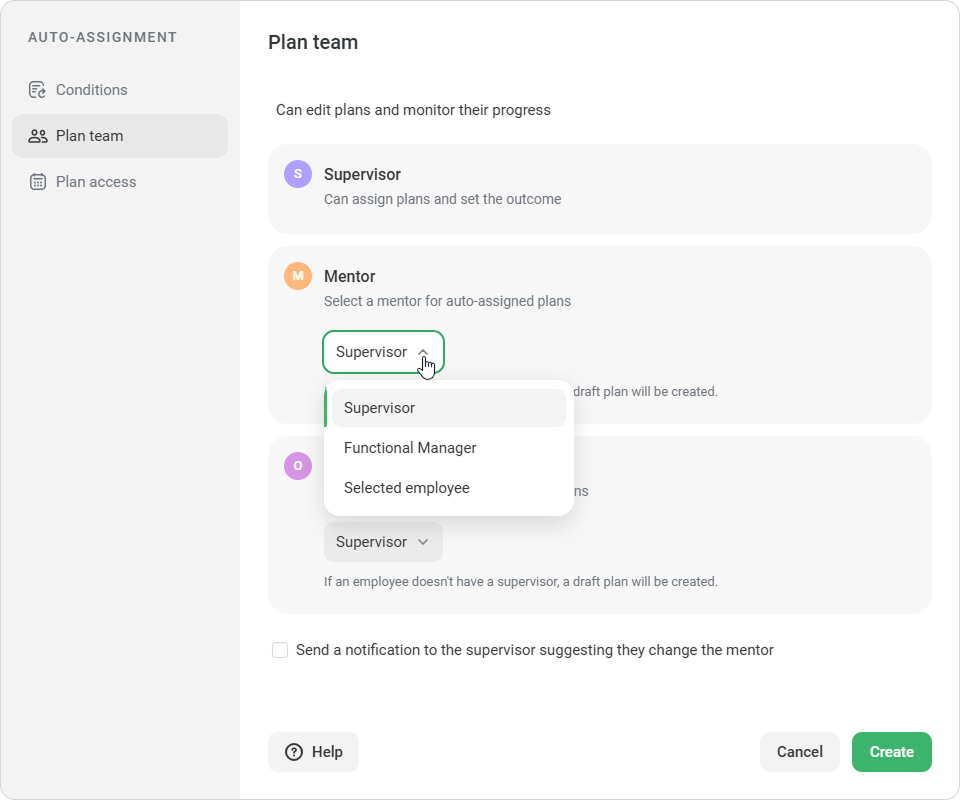
  2. Mentor
    The mentor helps the employee complete the plan. Select who the mentor will be:
    • Supervisor — the employee’s direct supervisor
    • Functional Manager — the employee’s manager in a specific work area
    • Selected employee — an employee you select manually. This employee will be assigned as the mentor for all auto-assigned plans created from this template

      If the selected employee becomes unavailable when the plan is assigned, iSpring LMS will add the employee’s supervisor instead. If there is no supervisor, iSpring LMS will add a functional manager.

      If no suitable manager is available, the plan will be created as a draft with an issue.
  3. Observer

    If the plan includes training sessions, another role will appear — Observer. This person will observe how the employee completes the tasks.

    You can select a supervisor or an employee who has permission to conduct training sessions. One observer is assigned to all training sessions in the plan.

To let supervisors choose a different mentor, select Send a notification to the supervisor suggesting they change the mentor.

  • The mentor is required. The observer is required if the plan includes training sessions.
  • If the selected employee has been deleted or blocked, select another employee.
    Otherwise, you won’t be able to save auto-assignment.

 When all required fields are filled in, you can move on.