LMS Standards
When publishing for an LMS, you can select one of the LMS standards that include information about the published course.
Supported LMS Standards
This article describes LMS reporting settings in the latest versions of iSpring Suite.
Depending on your version, course completion settings in the LMS publishing window may differ. The screenshots and instructions below apply to the current completion requirements interface.
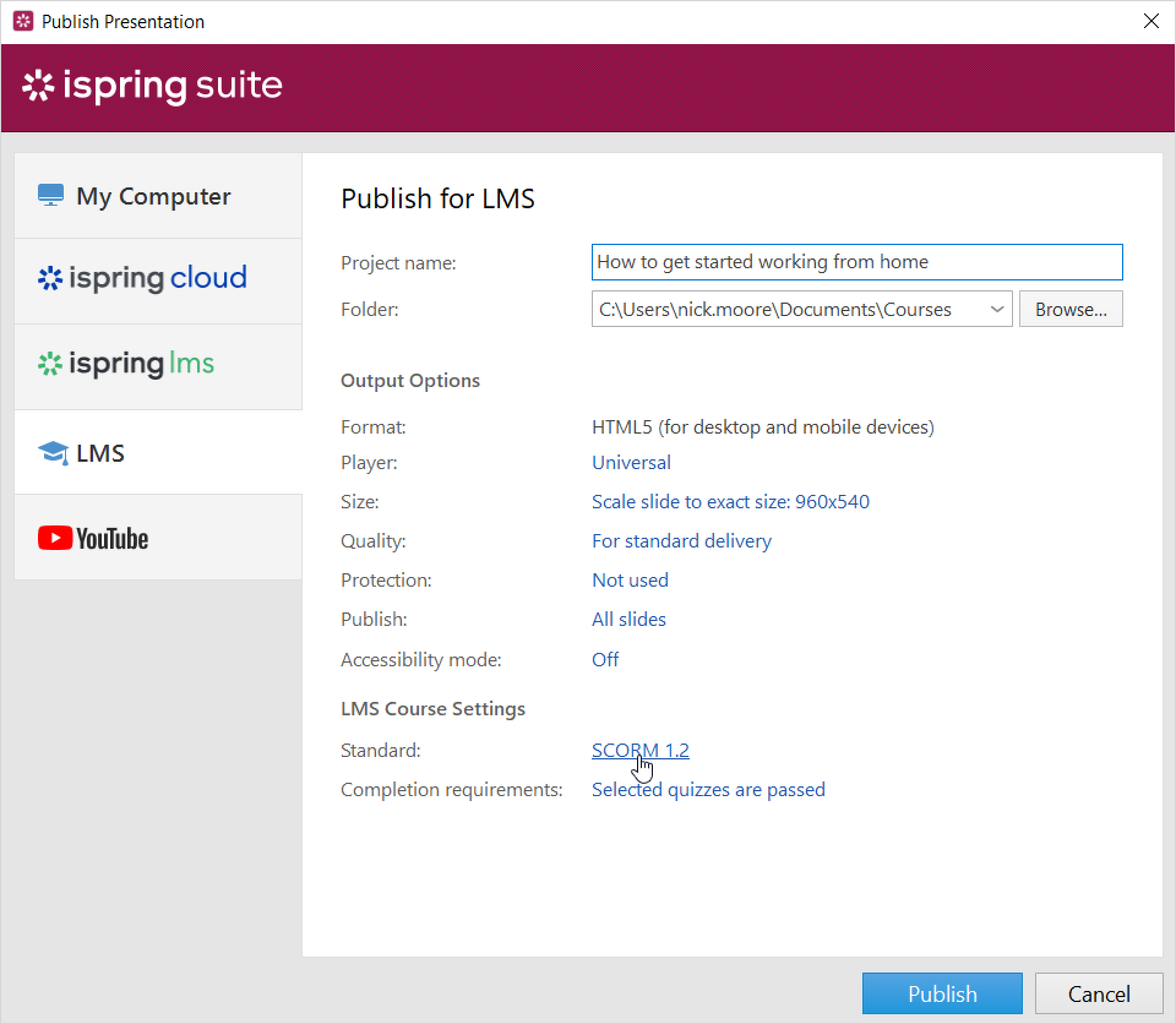
- Click on the Standard field. By default, it's SCORM 1.2.
- Next, select the standard supported by your LMS from the drop-down list:
• SCORM 1.2
• SCORM 2004
• AICC
• Experience API
• cmi5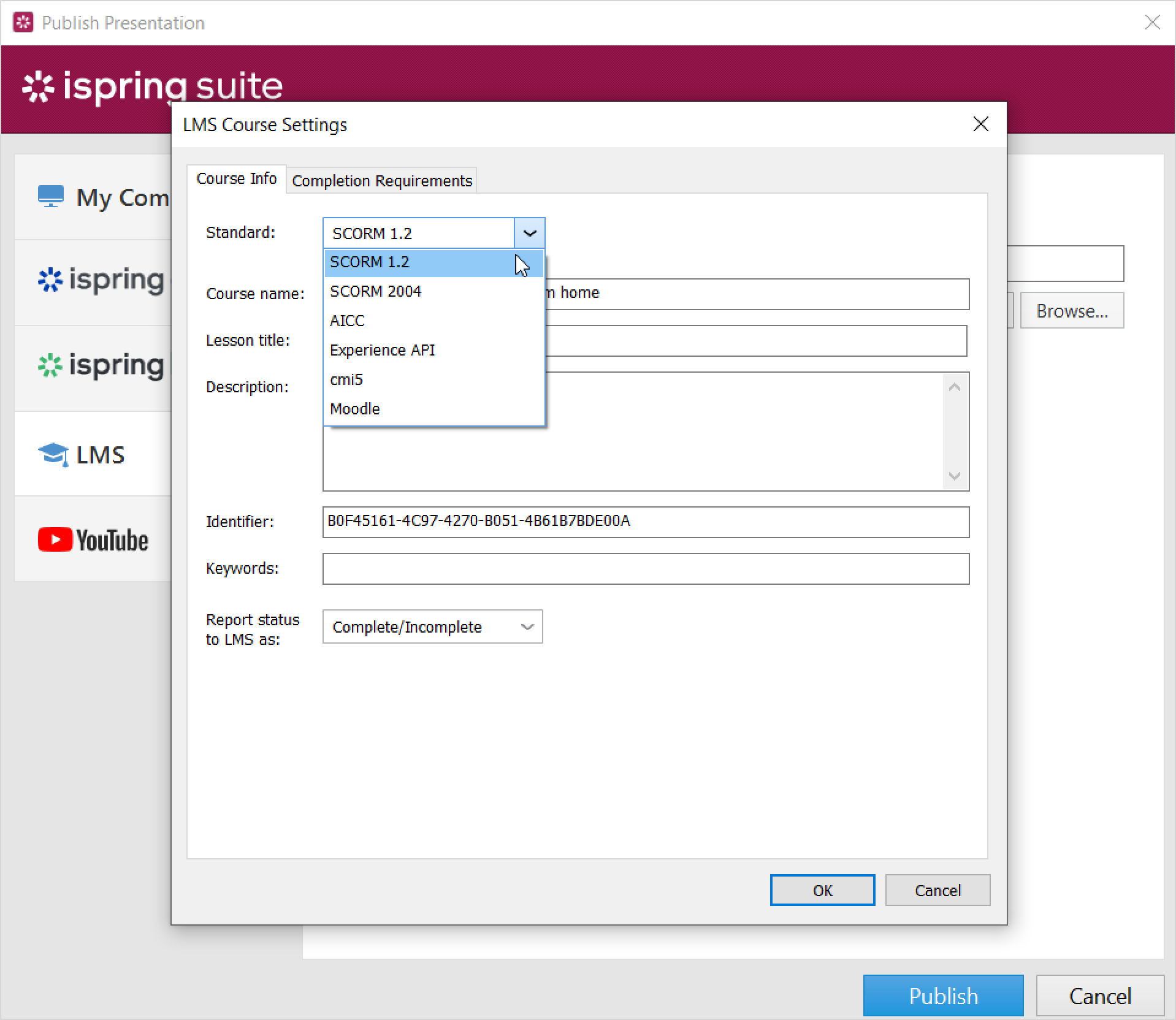
SCORM
SCORM is the most popular course format. It allows you not only to create a hierarchical structure of the content, but also to track learners' progress.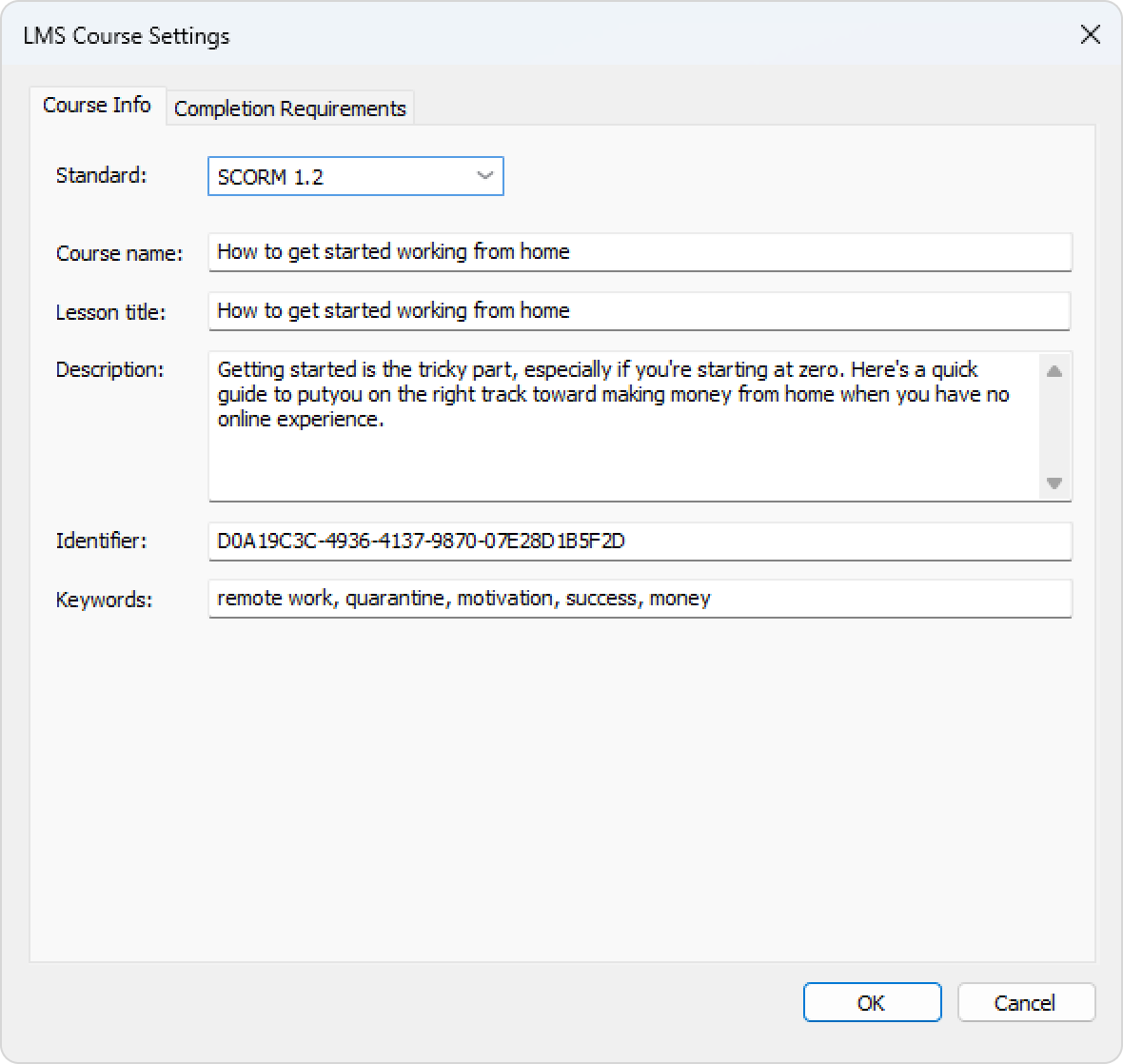
| Option | Description |
| Standard | Choose the SCORM package type: SCORM 1.2 or SCORM 2004. For SCORM 2004, you can select the 2nd, 3rd, or 4th edition. |
| Course name | Enter the name of the course that will be displayed in your LMS. |
| Lesson title | Enter the name of the lesson that will be displayed in your LMS. |
| Description | Enter a short description of the course. |
| Identifier | This is a unique code for the course. An identifier can be used by the LMS to distinguish one course from another. For example, if you download a course with the same ID, the LMS can offer to replace the previously downloaded ID You can completely change identifier, considering the following:
|
| Keywords | Choose keywords. They will help learners find your test faster. |
Change progress and completion parameters that will be applied when you upload the course to an LMS.
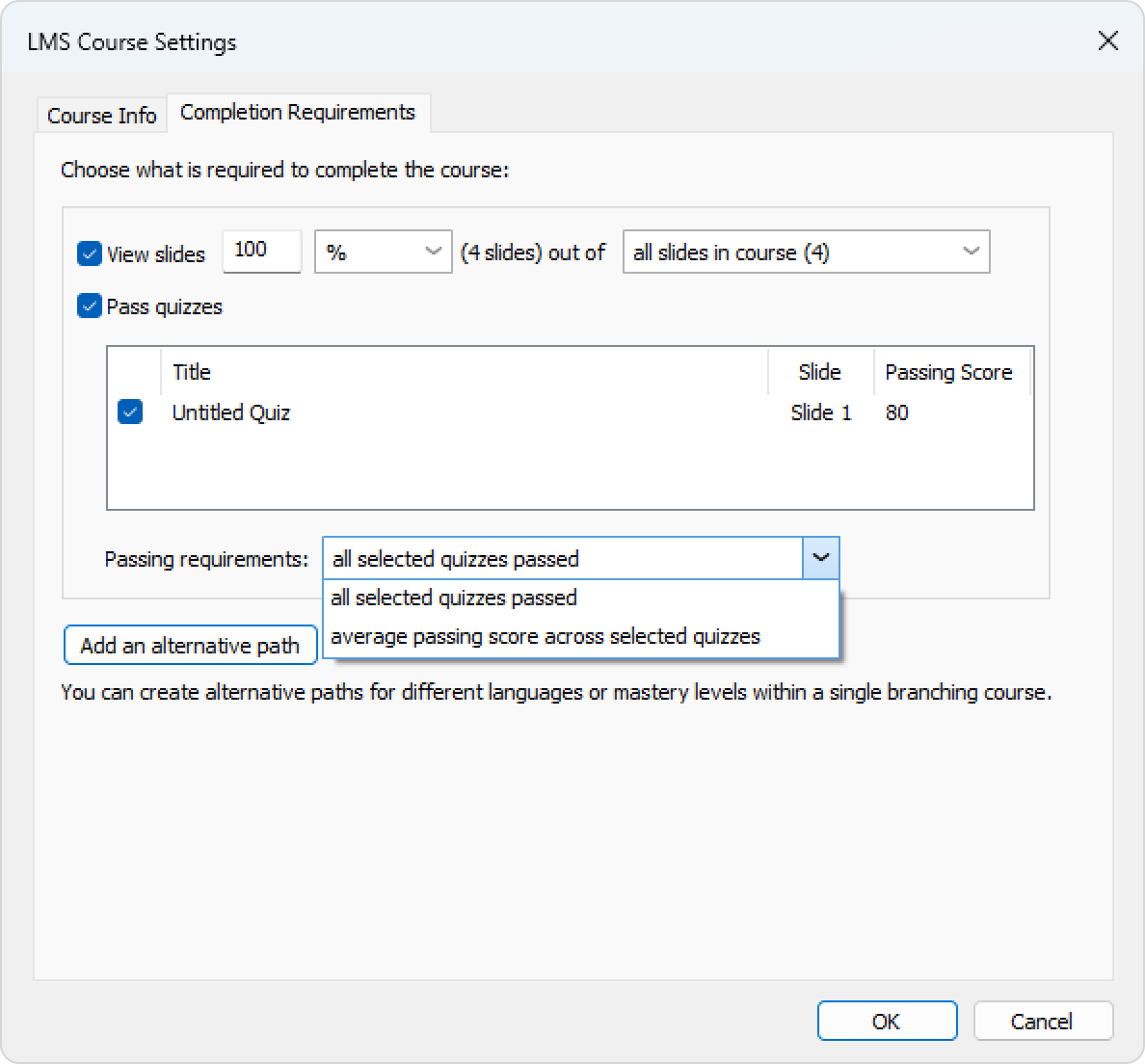
- Go to the Completion Requirements tab.
Next, set progress and completion parameters and click OK.
Option
Description
View slides __ out of___ Set the minimum number of slides learners must view for the course to be considered completed.
For example, if you set View slides 18 out of 20, learners will complete the course after viewing any 18 slides.
Pass quizzes and role-plays Select quizzes and role-plays that results will be included in the overall assessment of the course. If questions are selected at random in a quiz, then the maximum score for the course may differ because each question will add a different number of points to the total score. Passing requirements Choose how learners should pass the selected quizzes. Select one of the following options: All selected quizzes passed to require learners to pass every selected quiz, or Passing average score across selected quizzes __ % to require learners to achieve the specified average score across all selected quizzes. Add an alternative path You can create alternative paths for different languages or mastery levels within a single branching course.
AICC
AICC is the original eLearning standard. It is similar to SCORM, but less popular.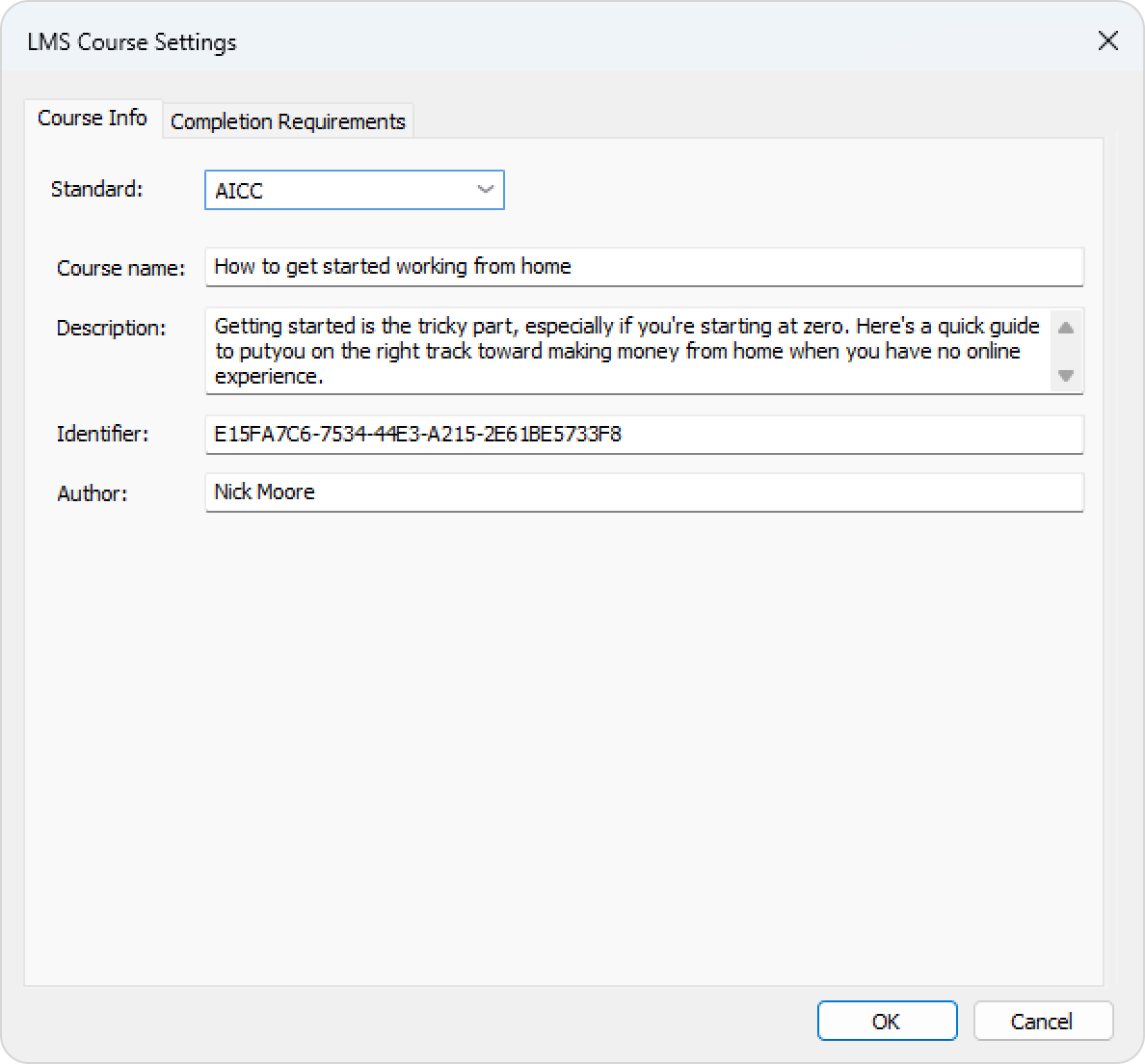
| Option | Description |
| Standard | Choose AICC. |
| Course name | Enter the name of the course that will be displayed in your LMS. |
| Description | Enter a short description of the course. |
| Identifier | This is a unique code for the course. An identifier can be used by the LMS to distinguish one course from another. For example, if you download a course with the same ID, the LMS can offer to replace the previously downloaded ID. |
| Author | Indicate the author of the course. |
Change progress and completion parameters that will be applied when you upload the course to an LMS.
- Go to the Completion Requirements tab.
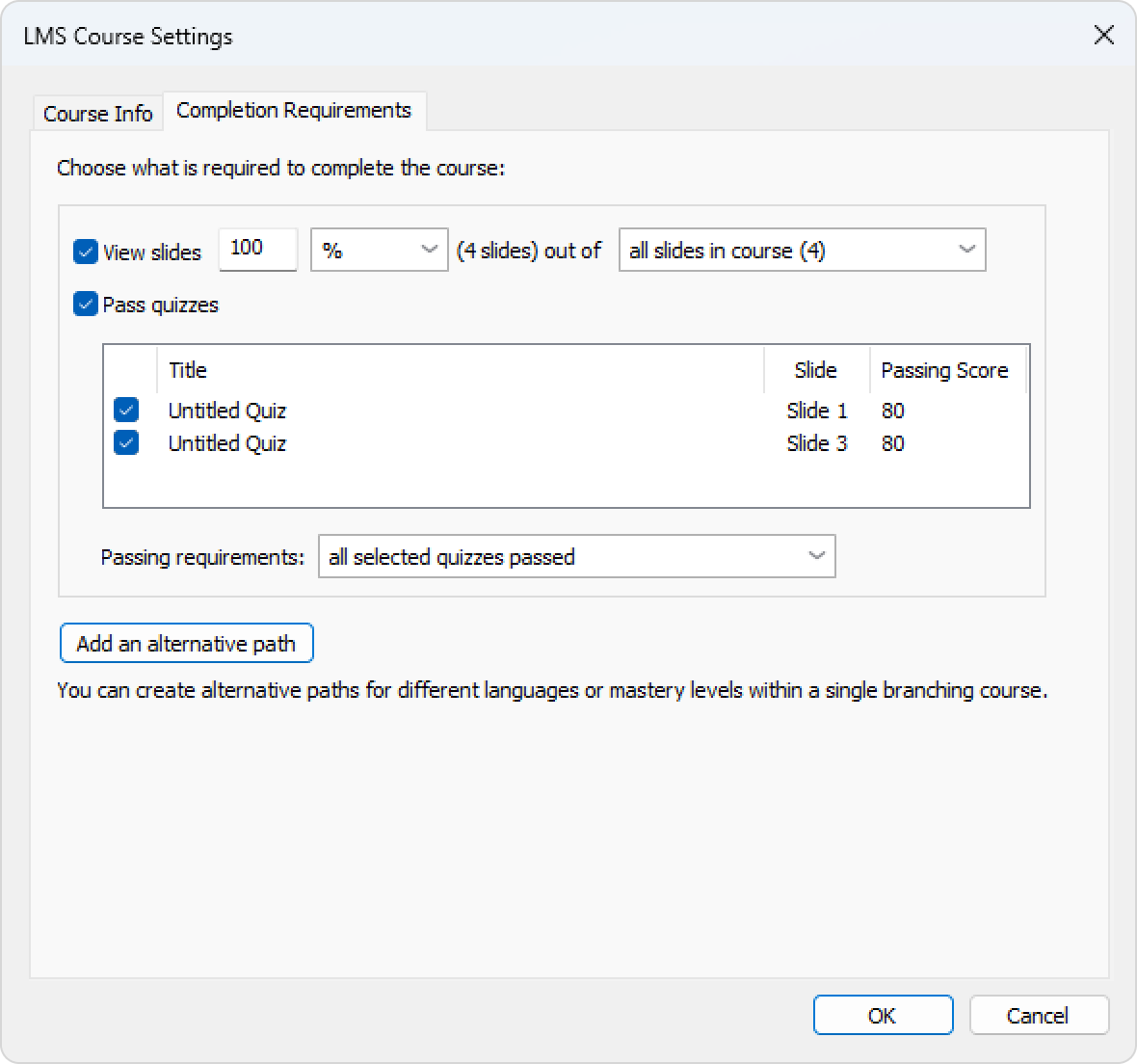
Next, set progress and completion parameters and click OK.
Option
Description
View slides __ out of___ Set the minimum number of slides learners must view for the course to be considered completed.
For example, if you set View slides 18 out of 20, learners will complete the course after viewing any 18 slides.
Rate quizzes and role-plays Select quizzes and role-plays that results will be included in the overall assessment of the course. If questions are selected at random in a given quiz, then the maximum score for the course may differ because each question adds a different number of points to the total score of the course. Passing requirements Choose how learners should pass the selected quizzes. Select one of the following options: All selected quizzes passed to require learners to pass every selected quiz, or Passing average score across selected quizzes __ % to require learners to achieve the specified average score across all selected quizzes. Add an alternative path You can create alternative paths for different languages or mastery levels within a single branching course.
Experience API (Tin Can)
Experience API allows you to track information about the activity of users in different learning environments, including outside the LMS.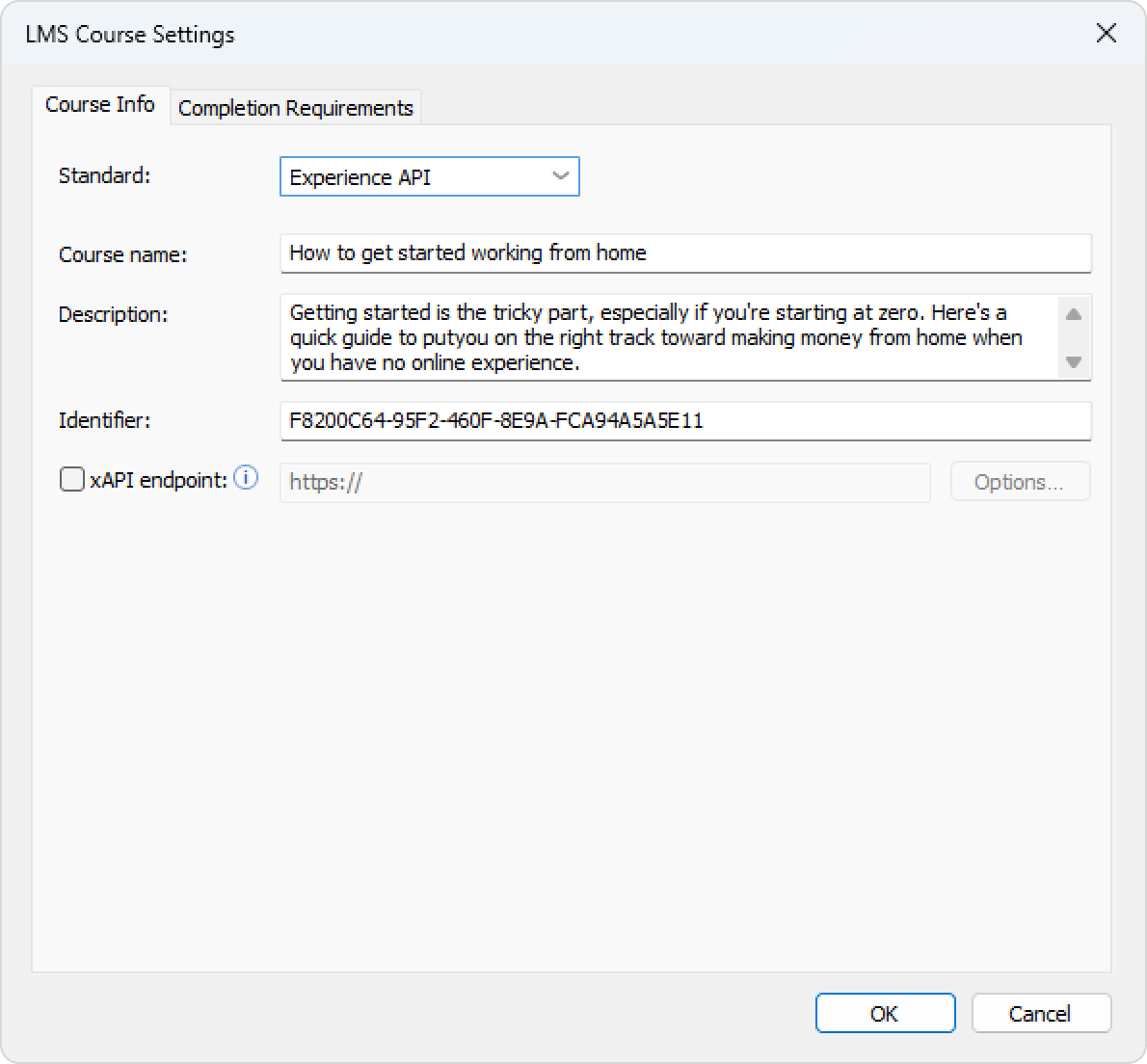
| Options | Description |
| Standard | Choose Experience API. |
| Course name | Enter the name of the course that will be displayed on your site. |
| Description | Enter a short description of the course. |
| Identifier | This is a unique code for the course. An identifier can be used by the LMS to distinguish one course from another. For example, if you download a course with the same ID, the LMS can offer to replace the previously downloaded ID. |
| xAPI endpoint | This is a data warehouse for learning activity. Enter the address of the Experience API (Tin Can) server where the training content items are stored. |
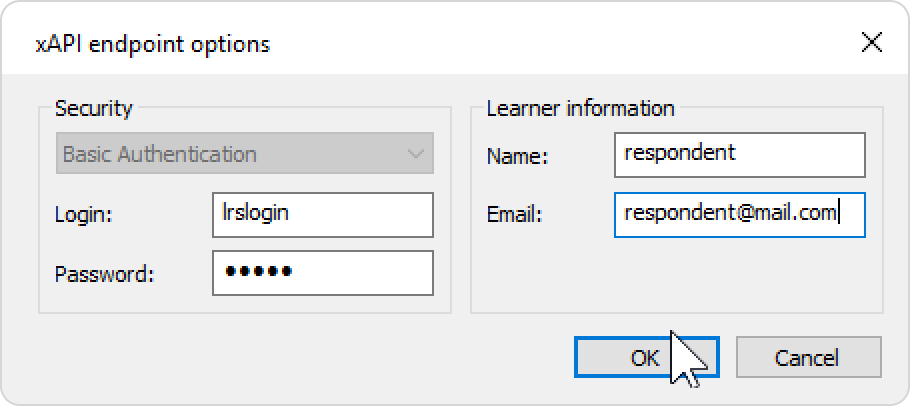
To set the Experience API (Tin Can) server parameters:
- Select the xAPI endpoint option and enter its URL. Next, click Options.
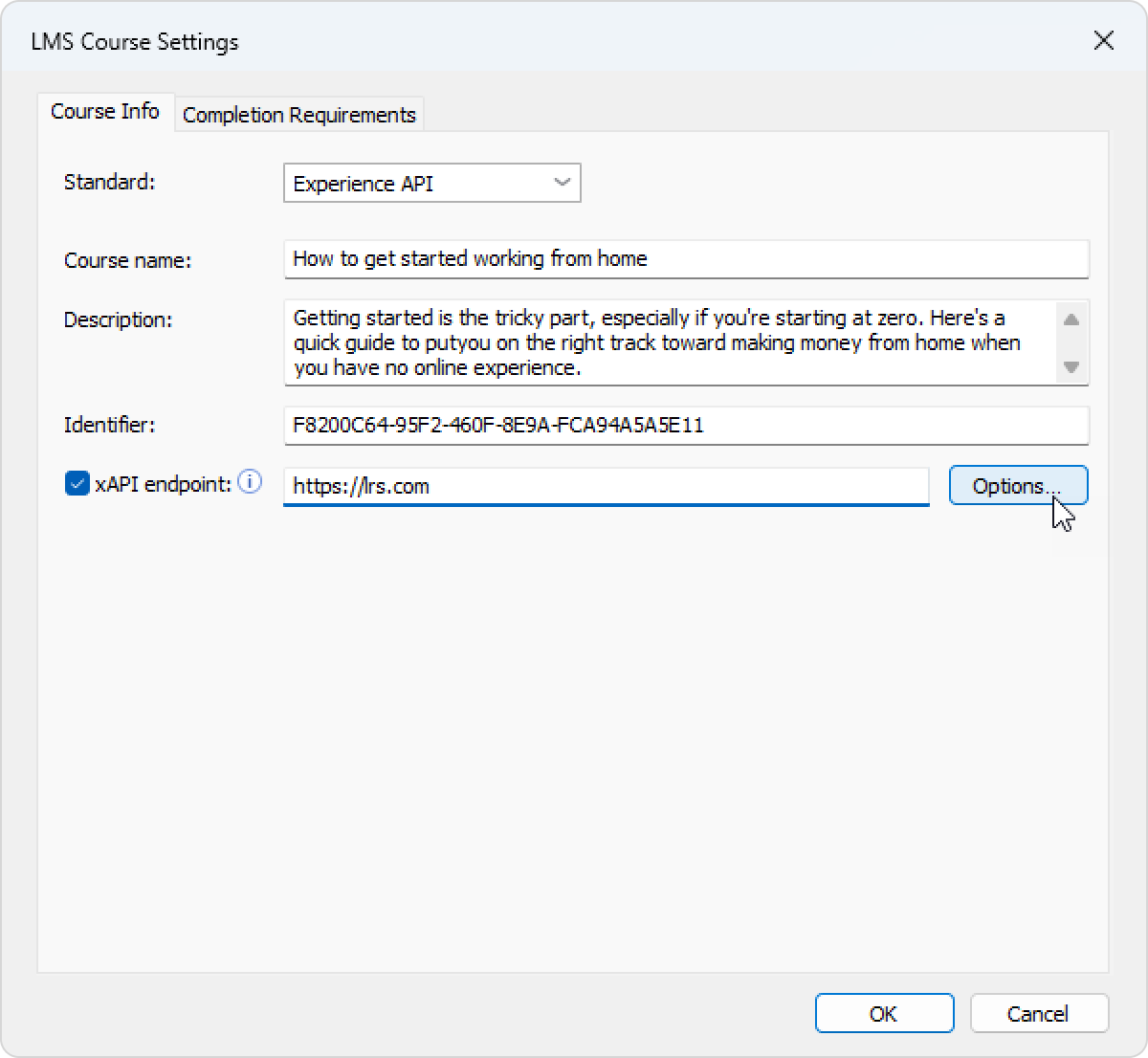
Select xAPI server parameters and click OK.
Option
Description
Login/Password Enter the account details for the Learning Record Store. Name/Email Choose the sender's data that will be used to send the statistics. The Learner Information section can be left blank. In this case, when starting the course, users will have to enter their name and email address.
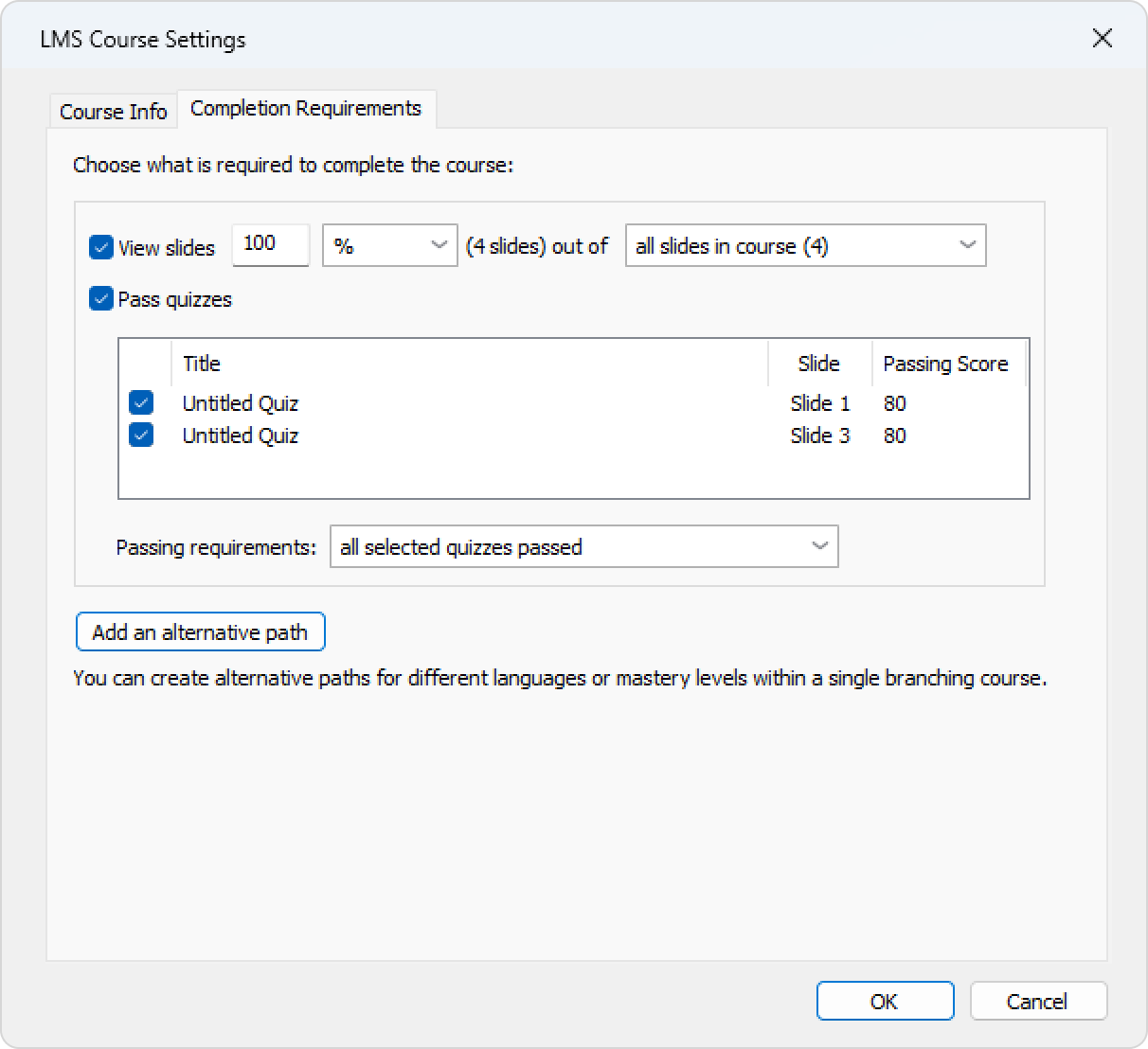
Change progress and completion parameters that will be applied when you upload the course to an LMS.
- In the Completion Requirements tab set progress and completion parameters and click OK.
Option
Description
View slides __ out of___ Set the minimum number of slides learners must view for the course to be considered completed.
For example, if you set View slides 18 out of 20, learners will complete the course after viewing any 18 slides.
Rate quizzes and role-plays Select quizzes and role-plays that results will be included in the overall assessment of the course. If questions are selected at random in a given quiz, then the maximum score for the course may differ. This is due to the fact that each question adds a different number of points to the total score of the course. Passing requirements Choose how learners should pass the selected quizzes. Select one of the following options: All selected quizzes passed to require learners to pass every selected quiz, or Passing average score across selected quizzes __ % to require learners to achieve the specified average score across all selected quizzes. Add an alternative path You can create alternative paths for different languages or mastery levels within a single branching course.
cmi5
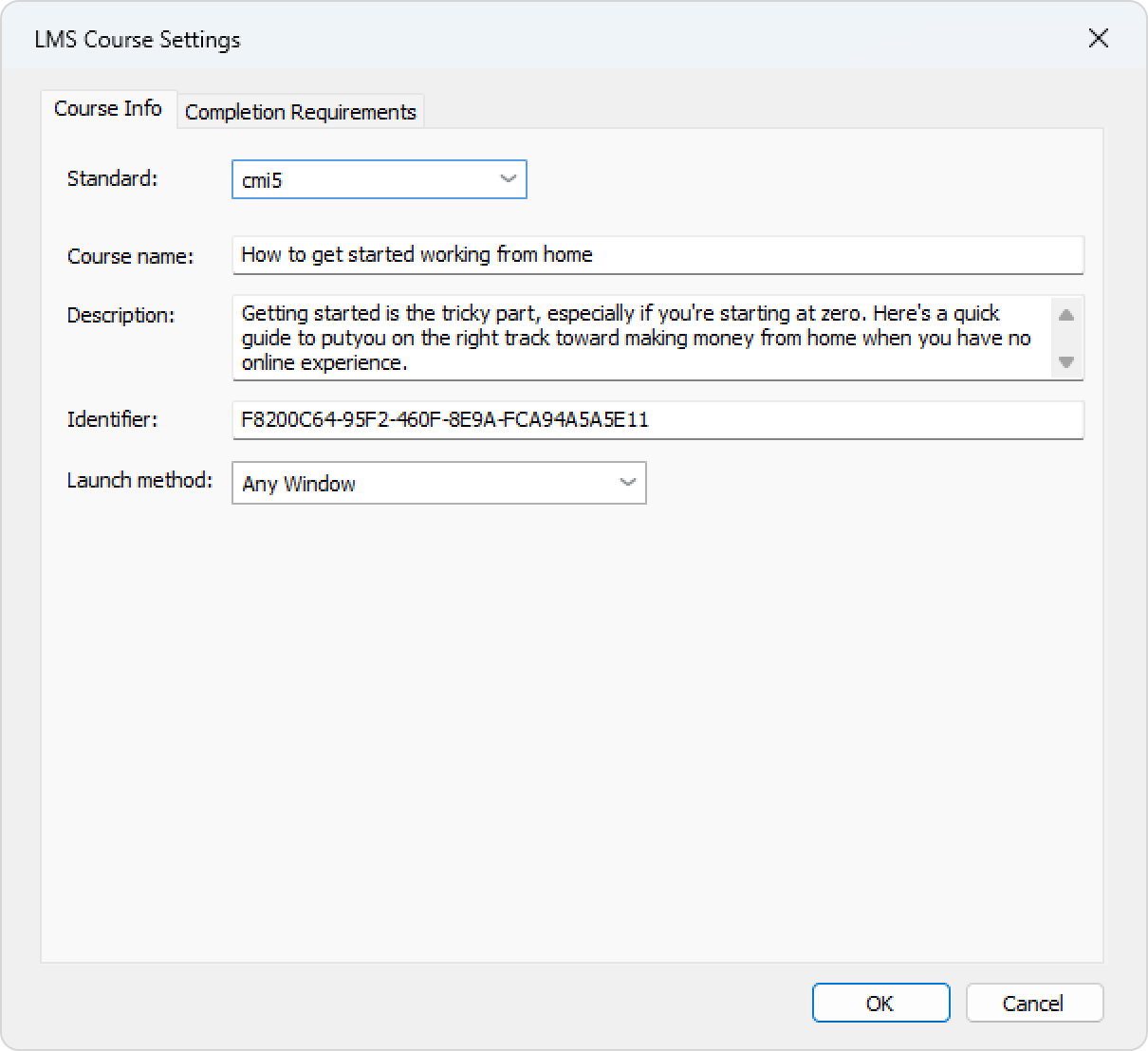
cmi5 presents a set of rules that combines the capabilities of SCORM and Experience API. cmi5 allows you to take tests both online and offline.
| Option | Description |
| Standard | Choose cmi5. |
| Course name | Enter the name of the course that will be displayed on your site. |
| Description | Enter a short description of the course. |
| Identifier | This is a unique code for the course. An identifier can be used by the LMS to distinguish one course from another. For example, if you download a course with the same ID, the LMS can offer to replace the previously downloaded ID. |
| Launch method | Choose how the course will be opened in the LMS:
|
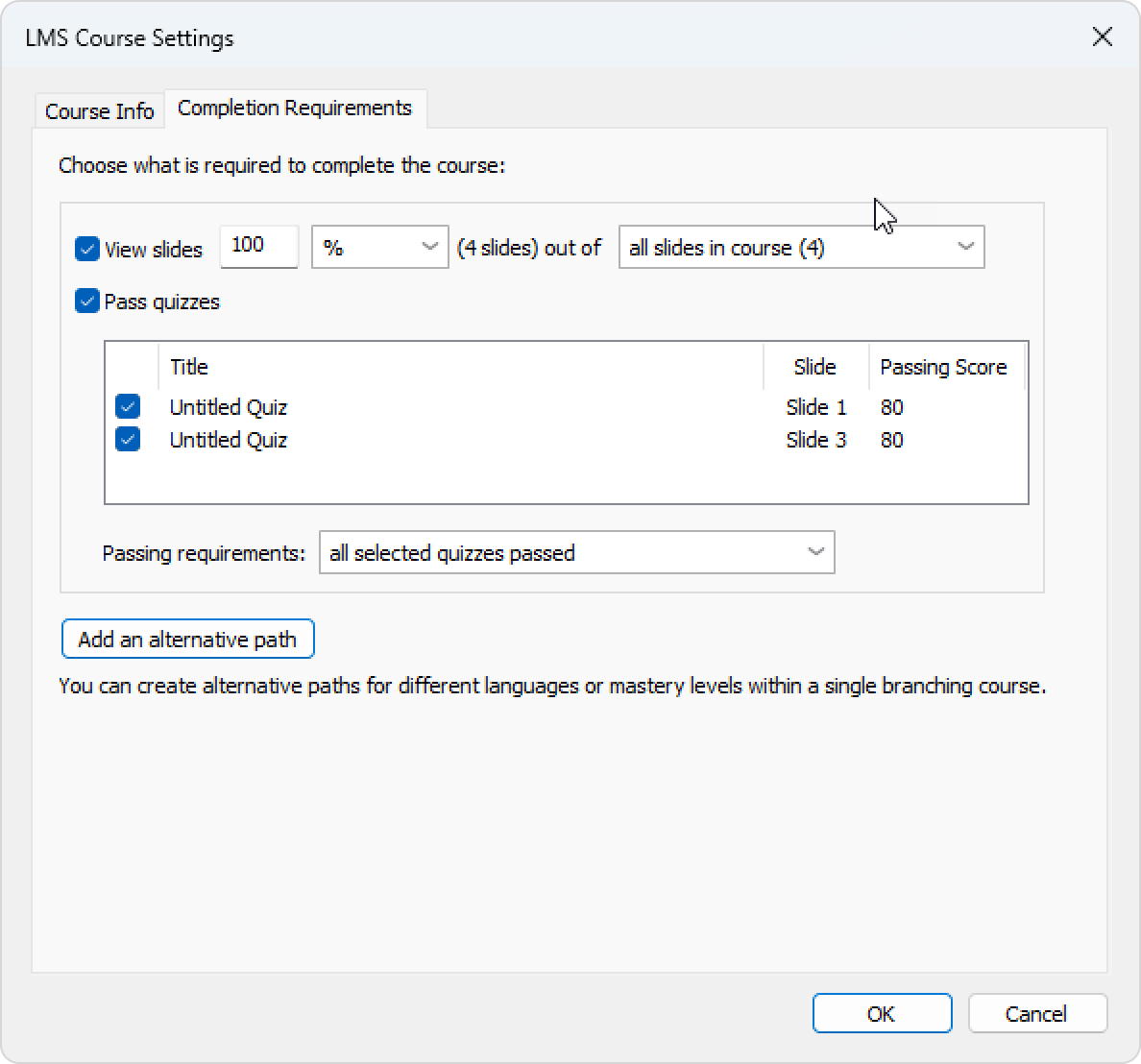
Change progress and completion parameters that will be applied when you upload the course to an LMS.
In the Completion Requirements tab, set progress and completion parameters and click OK.
Option
Description
View slides __ out of___ Set the minimum number of slides learners must view for the course to be considered completed.
For example, if you set View slides 18 out of 20, learners will complete the course after viewing any 18 slides.
Rate quizzes and role-plays Select quizzes and role-plays that results will be included in the overall assessment of the course. If questions are selected at random in a given quiz, then the maximum score for the course may differ. This is due to the fact that each question adds a different number of points to the total score of the course. Passing requirements Choose how learners should pass the selected quizzes. Select one of the following options: All selected quizzes passed to require learners to pass every selected quiz, or Passing average score across selected quizzes __ % to require learners to achieve the specified average score across all selected quizzes. Add an alternative path You can create alternative paths for different languages or mastery levels within a single branching course.