The Narration Editor is a built-in tool for recording, importing, and processing audio narration.
To open the Narration Editor:
- Click the Manage Narration button on the iSpring Converter Pro 10 toolbar.

The Narration Editor will open in a new window.
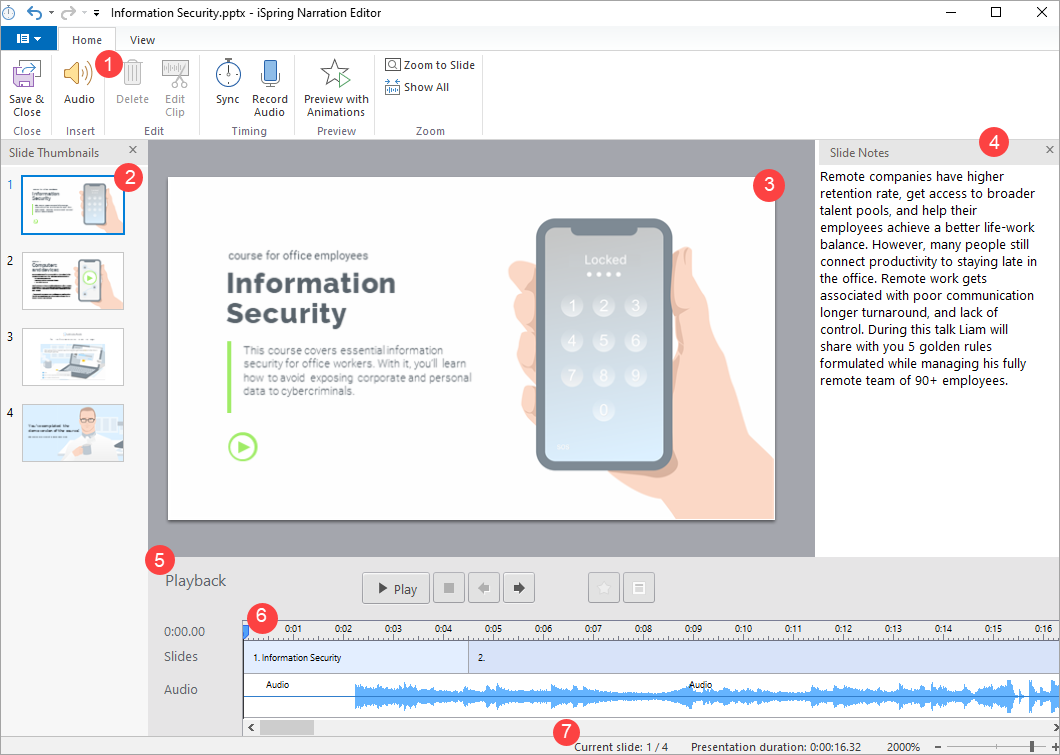
| Area | Description |
|---|
| 1 | The toolbar |
| 2 | The slide list |
| 3 | The slide preview |
| 4 | The presentation notes. If you edit your notes in the Narration Editor, they will be updated in your PowerPoint presentation. |
| 5 | The playback and recording pane. |
| 6 | The timeline serving to synchronize audio clips with your slides. |
| 7 | The status bar containing info on the total number of slides, presentation duration, and zoom slider. |